Azure AI Foundry
Arrakis discovers every Azure AI Foundry resource, project, model deployment, and agent under a customer subscription using a single Entra ID service principal. Two token audiences are required: an ARM control-plane token (https://management.azure.com/.default) for resource enumeration, and a Foundry data-plane token (https://ai.azure.com/.default) for reading agents and tool configuration. The Agents data-plane API does not accept API keys — Entra ID is the only supported auth.
When to use this
Use this page if your organization runs agents on Azure AI Foundry (formerly Azure AI Studio) and you want Arrakis to govern them across the four pillars — configuration, runtime, reasoning, and preventive. The same setup works whether you have a single Foundry resource or many across a subscription; one service principal authenticates against the whole subscription and reaches every project.
Coverage
| Pillar | Support |
|---|---|
| Configuration | Full — Azure AI admin; Foundry control-plane discovery |
| Runtime | Full — Azure Monitor + Event Grid |
| Reasoning | Full — Azure Monitor (prompt and response) |
| Preventive | Full — Azure AI Content Safety; webhook auto-remediation |
For the cross-platform context, see the Connectors overview — Foundry sits in the Autonomous Agents category.
3-step Quickstart
- Register an Entra ID app and create a client secret. Note the
tenantId,clientId, and the secret value. - Assign Reader and Foundry User to that service principal at subscription scope (recommended — both roles inherit to every existing and future Foundry project). For behavioral detections, also assign Log Analytics Reader and Cost Management Reader at the same scope. For multiple subscriptions, assign once at a Management Group that contains them all (see step 6). Per-resource or per-project assignment is also supported when you want tighter segmentation. Heads-up: this step requires Owner or User Access Administrator on the target scope — a Contributor cannot assign roles.
- In Arrakis, go to Settings → Integrations → Add integration → Azure AI Foundry, paste the four fields (
tenantId,clientId,clientSecret,subscriptionId), test, and save.
What each tier of permissions unlocks. Reader + Foundry User cover Tier 1 (configuration & posture). Adding Log Analytics Reader + Cost Management Reader unlocks Tier 2 (runtime behavior). Tier 3 requires Application Insights attached to every project — either by the customer, or by Arrakis if you grant the optional auto-provisioning roles. See the Detection tiers callout below.
Where tenant-specific values come from
Sign in to the Arrakis platform → Settings → Integrations → Azure AI Foundry. The connector form, test endpoint, and sync controls live there. The four fields you paste —
tenantId,clientId,clientSecret,subscriptionId— come from your Azure tenant.
Permission model
A single service principal carries control-plane, data-plane, and (optionally) trace-read access. Roles fall into three groups by the detection tier they unlock:
Detection tiers
Arrakis’ Foundry detections layer by permission scope. Understand these before choosing which roles to assign — the higher tiers require additional roles beyond the baseline pair.
- Tier 1 — configuration & posture. Requires Reader + Foundry User. Delivers static discovery, misconfiguration detection, drift, and full agent inventory.
- Tier 2 — runtime behavior. Adds Log Analytics Reader + Cost Management Reader. Delivers prompt/response anomaly detection, tool-use patterns, and per-agent cost spike alerts. Without these two roles, Arrakis cannot read Foundry traces or attribute token cost.
- Tier 3 — deep behavioral. Tier 2, plus trace coverage on every project. Most Foundry projects ship without Application Insights attached, so no traces are produced by default. The customer either attaches Application Insights per project themselves, or grants Arrakis the optional auto-provisioning roles to do it in-place across every project we discover.
Role summary
A single service principal carries every role below. Assign whichever tier matches your desired coverage.
| Role | Tier | Scope | Why |
|---|---|---|---|
| Reader | 1 (required) | Subscription (or a management group containing the subscription) | Enumerates every Microsoft.CognitiveServices Foundry account, expands each into its projects, and lists model deployments via ARM. Without subscription-scoped Reader, multi-instance discovery cannot find resources. |
| Foundry User | 1 (required) | Subscription scope is the recommended default — covers every Foundry project under it, including new ones, with no per-project onboarding. Resource or per-project scope works too when tighter segmentation is required. | Grants reader access to each Foundry project plus the data actions needed to list and read agents/assistants, their instructions, tools, and tool_resources. The Agents data-plane API does not support API keys — this role must go to the same Entra ID service principal. |
| Log Analytics Reader | 2 (recommended) | Subscription or management group — matches the Reader / Foundry User pattern so a single assignment covers every workspace, existing and future. RG scope also works when only specific RGs host AI workspaces. | Reads Foundry runtime traces via the Log Analytics query API. Without this role, Arrakis can enumerate agents but never observe their runtime behavior — Tier 2 and Tier 3 detections stay dark. |
| Cost Management Reader | 2 (recommended) | Subscription or management group. Cost Management Reader is not assignable below subscription level. | Reads Microsoft.Consumption / Microsoft.CostManagement data. Correlates token cost to individual trace rows and agent invocations — the signal that drives cost-anomaly and abusive-agent detections. |
| Log Analytics Contributor | 3 (optional) | Subscription or management group (recommended). RG scope is available if you designate a specific RG for observability resources. | Only needed if you want Arrakis to attach Application Insights to projects that lack it. Creates the Microsoft.OperationalInsights/workspaces and Microsoft.Insights/components resources we then attach. Skip this role if your projects already have Application Insights configured. |
| Azure AI Project Manager | 3 (optional) | Subscription (recommended) — inherits to every Foundry resource and project. Resource or per-project scope works for tighter segmentation. Role ID eadc314b-1a2d-4efa-be10-5d325db5065e. | Only needed for auto-provisioning. Edits Foundry project properties to attach the newly-created Application Insights resource. Microsoft’s documented least-privilege role for project configuration edits — strictly narrower than Contributor. |
Which data-plane role to assign — and which not to
Microsoft’s Foundry RBAC roles were renamed in early 2026: Foundry User is the current name for what was previously called Azure AI User. The role ID and permissions did not change. To make role assignments stable across the rename, prefer assigning by role ID 53ca6127-db72-4b80-b1b0-d745d6d5456d rather than by name.
Do not use Cognitive Services User for this connector. Microsoft’s Foundry RBAC documentation explicitly states that Cognitive Services-prefixed roles “are designed for accessing AI Services resources directly and don’t apply to Foundry scenarios.” Cognitive Services User does not grant the Microsoft.CognitiveServices/accounts/AIServices/agents/* data actions that the Foundry data plane requires for /api/projects/<project>/assistants. Cognitive Services Contributor and Azure AI Developer are similarly out of scope — Azure AI Developer applies to AML workspaces and legacy Foundry hubs, not to Foundry projects.
If a tenant is partway through the rename (the Azure Portal can lag the documentation by a release), Azure AI User will still resolve to the same role ID; both names are accepted while the rename rolls out. The az CLI examples below assign by role ID for that reason.
Why subscription-wide read-only
Foundry resources are not always inventoried up front, and new projects are often spun up by application teams. Subscription-scoped Reader lets Arrakis pick up new resources automatically, with no per-resource onboarding step. Reader is read-only on the control plane and grants no data-plane access on its own — agent and tool reads still require Foundry User on each project. Write access is never granted.
Least-privilege caveats
- Reader at subscription scope grants enumeration of every resource type in that subscription, not only AI resources. If the subscription contains workloads outside Foundry, scope Reader to a management group that contains only the AI subscription, or split AI workloads into their own subscription.
- Reader does not grant access to keys or secrets (no
listKeysaction). Data-plane reads remain gated by Foundry User on each project. - Foundry User inherits down the Azure resource hierarchy: assigned at subscription scope it covers every Foundry resource and project (existing and future) under that subscription — the simplest, future-proof setup. Assign at Foundry resource scope to cover all projects under one account, or at individual project scope for tighter segmentation. All three scopes work; pick whichever matches your governance posture.
Prerequisites
- An Azure subscription with at least one Foundry resource (kind
AIServicesorAIFoundry). - Permission to create app registrations in Microsoft Entra ID and assign Azure RBAC roles, or coordination with an admin who can.
- Your
tenantIdandsubscriptionIdto hand.
Azure Portal walkthrough
The Portal click-path. UI labels match the Azure Portal at the time of writing.
1. Register an Entra ID app
- Microsoft Entra ID → App registrations → New registration.
- Name:
arrakis-foundry-reader. Supported account types: single tenant. Redirect URI: leave blank. - Register. On the resulting overview page, copy Application (client) ID → this is your
clientId. Copy Directory (tenant) ID → this is yourtenantId.
Screenshot: App registrations → Overview, with Application (client) ID and Directory (tenant) ID fields highlighted.
2. Create a client secret
- On the same app, Certificates & secrets → Client secrets → New client secret.
- Description:
arrakis-connector. Expires: per your rotation policy (recommend 6 or 12 months). - Add. Copy the Value column immediately — this is your
clientSecret. It is shown once.
Screenshot: Certificates & secrets → Client secrets, with the Value column highlighted and the warning that it cannot be retrieved later.
3. Grant Reader at subscription scope
Prerequisite — who can do this. Assigning roles requires Owner or User Access Administrator on the target scope. A subscription Contributor cannot assign roles. If the IAM page shows Add role assignment as greyed out, ask a subscription Owner / User Access Administrator to run this step (or run it for you), or have your Entra ID Global Administrator elevate access so they can assign at the Tenant Root Management Group.
- Open the Azure Portal and go to Subscriptions (search bar at the top is the fastest path). Click your subscription.
- In the left blade, click Access control (IAM).
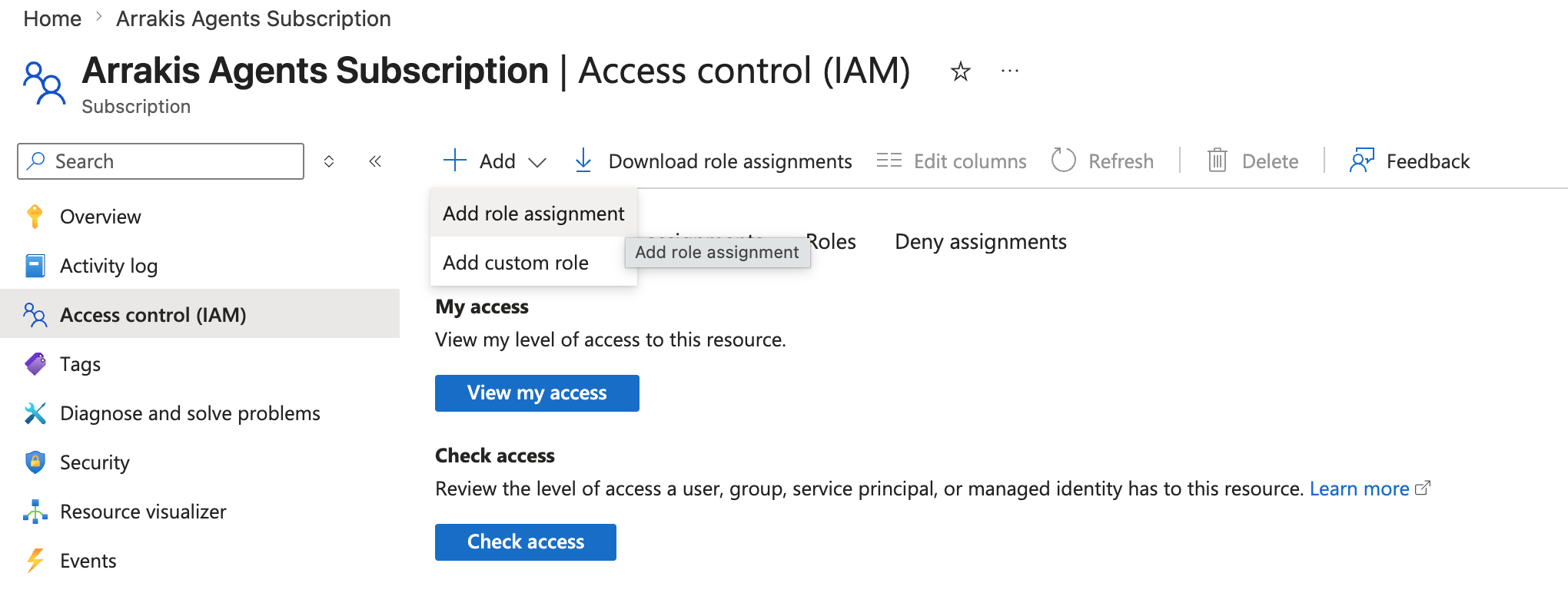
- Click + Add at the top, then Add role assignment.
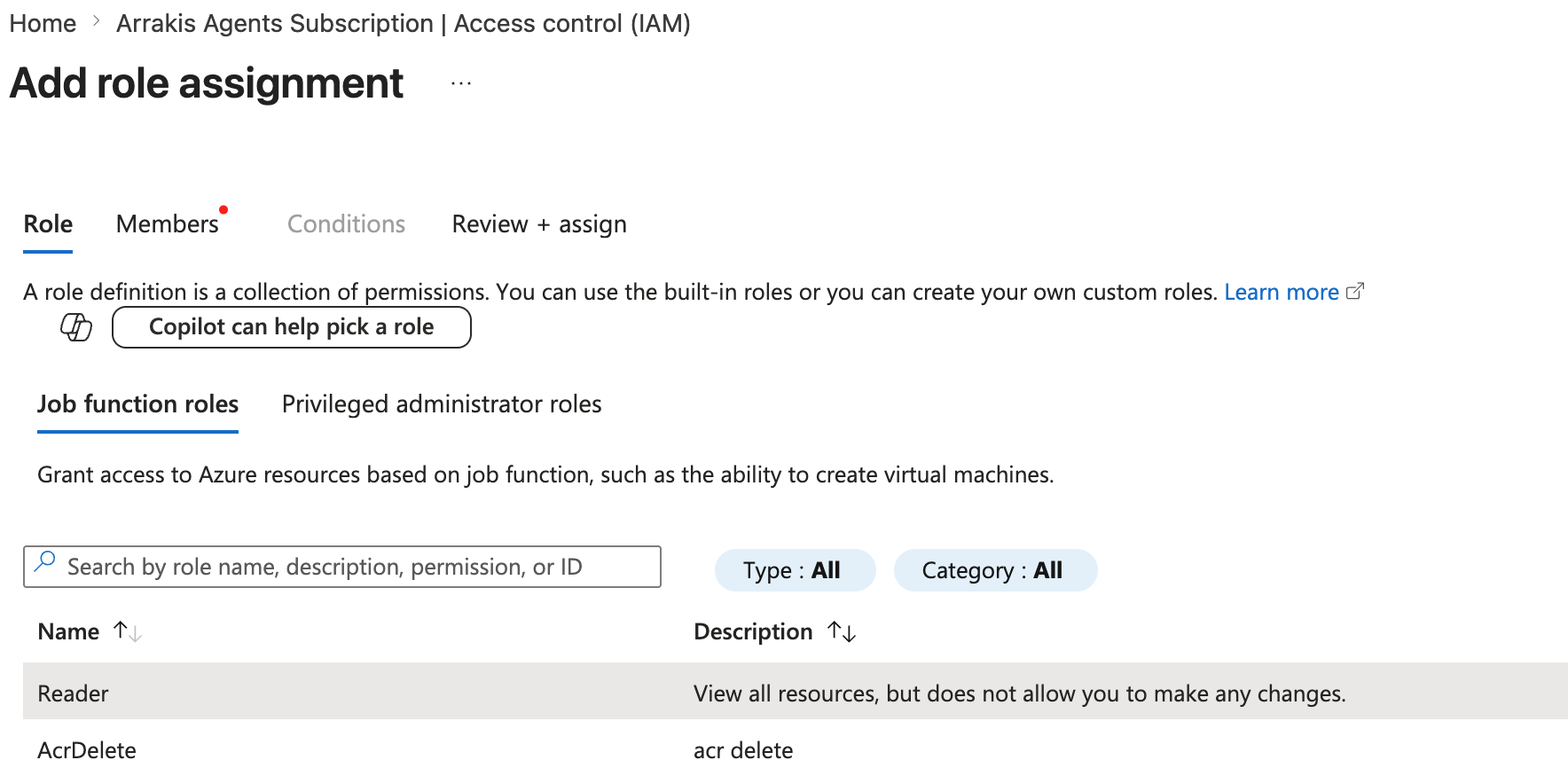
- Role tab. Make sure you are on the Job function roles tab (not Privileged administrator roles). In the search box, type
Reader. Select Reader (exact name — not Reader and Data Access, Storage Blob Data Reader, or any other reader-prefixed role). Click Next.
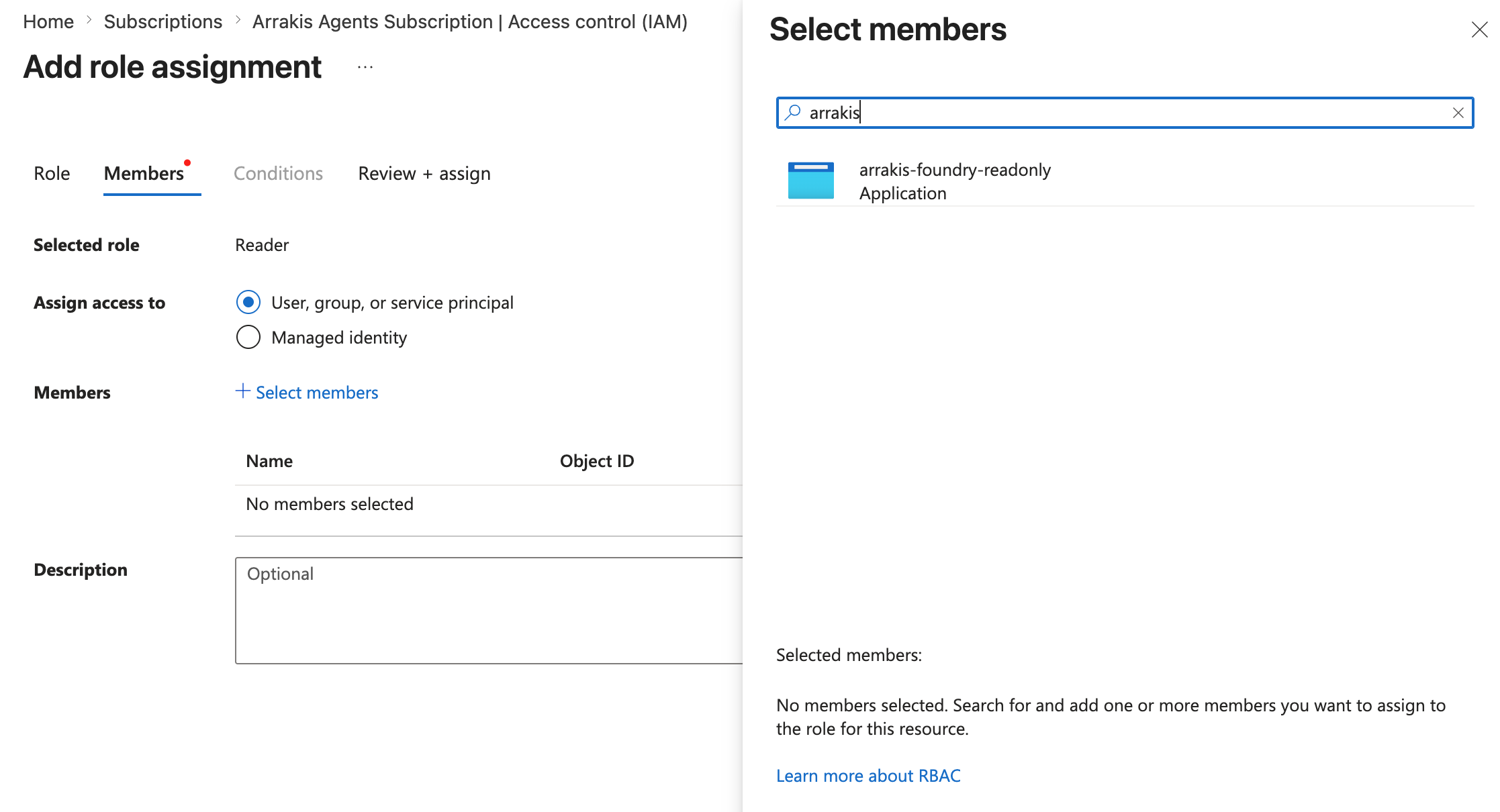
- Members tab. Under Assign access to, leave User, group, or service principal selected. Click + Select members.
- In the right-hand pane, type
arrakis-foundry-reader(or whatever you named the app in step 1). Service principals do not appear until you type their name — an empty list is normal until you search. Click the entry when it appears, then click Select at the bottom of the pane. Click Next.
- Review + assign tab. Confirm the Scope at the top reads
/subscriptions/<your-sub-id>and click Review + assign. - Wait ~60 seconds for the assignment to propagate before testing the connection in Arrakis. Role assignments are eventually consistent — a “test connection” run within the first 30 seconds may still 403.
4. Grant Foundry User at subscription scope (recommended)
Foundry User inherits down the Azure resource hierarchy, so a single assignment at the subscription scope covers every Foundry resource and project under that subscription — including any new ones spun up later. This is the simplest, most future-proof option.
Same prerequisite as step 3. You need Owner or User Access Administrator on the subscription. If step 3’s Add role assignment worked, this one will too.
- Stay on the same Subscription → Access control (IAM) page (no need to navigate away).
- Click + Add → Add role assignment again.
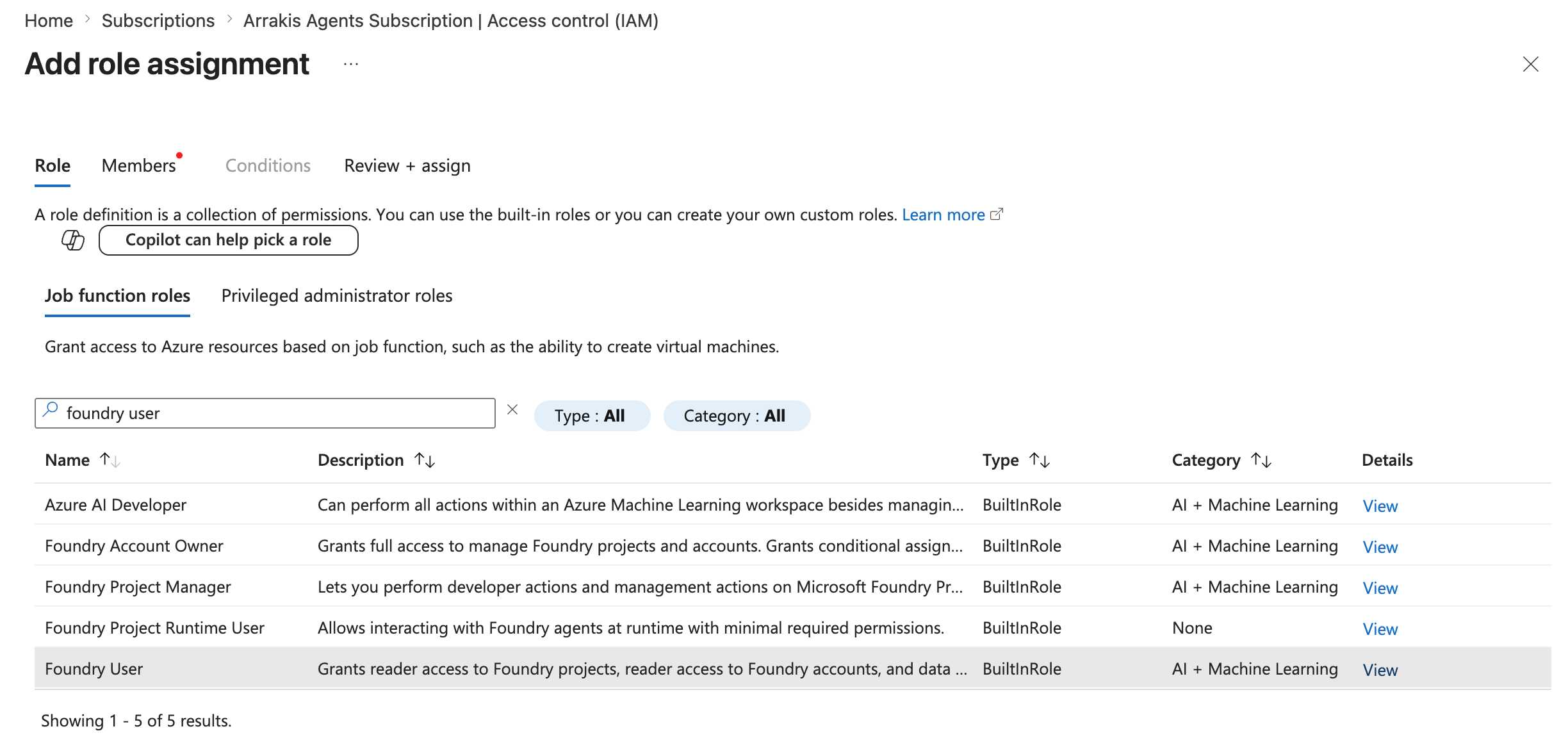
- Role tab → Job function roles. In the search box type
Foundry User. If your tenant still shows the previous name, searchAzure AI User— it resolves to the same role ID (53ca6127-db72-4b80-b1b0-d745d6d5456d) and is equivalent. Select the role and click Next.
- Members tab. Click + Select members, search for the same
arrakis-foundry-readerservice principal, select, Select, Next. - Review + assign.
Do not pick a Cognitive Services-prefixed role here. Customers occasionally assign Cognitive Services User by mistake because it sounds related — it is not. Cognitive Services User does not grant the
Microsoft.CognitiveServices/accounts/AIServices/agents/*data actions Arrakis needs, and the connector will return403listing assistants. The same applies to Cognitive Services Contributor and Azure AI Developer.
Verify the assignments before moving on
Run this in Cloud Shell (or local az) to confirm both roles landed on the right principal at the right scope:
az role assignment list \
  --assignee <clientId> \
  --scope /subscriptions/<sub-id> \
  --query "[].{role:roleDefinitionName, scope:scope}" \
  -o table
Expected output: two rows (Tier 1 only), Reader and Foundry User (or Azure AI User during the rename window), both scoped to /subscriptions/<sub-id>. If you also complete steps 4a and 4b, the list will show up to four additional roles (Log Analytics Reader, Cost Management Reader, and optionally Log Analytics Contributor + Azure AI Project Manager). If any expected row is missing, the assignment did not save — re-run that step.
When to scope tighter instead
Assign Foundry User at one of the narrower scopes if your governance posture requires it:
- Foundry resource (account) scope — Foundry resource page → Access control (IAM) → Add role assignment. Covers all projects under that account.
- Individual project scope — Foundry project page → Access control (IAM) → Add role assignment. Per-project segmentation; you’ll repeat for every project.
4a. Grant Log Analytics Reader + Cost Management Reader (recommended for Tier 2/3 detections)
Behavioral detections rely on Foundry runtime traces, which live in Log Analytics. Reading those traces — and correlating token cost per call — requires two additional roles. Both live at the same scope you used in steps 3 and 4, so this is one IAM visit, not two separate scopes.
Skip only if you know you don’t need Tier 2/3 detections. Without these two roles, Arrakis can inventory every agent but never observes runtime behavior — prompt/response anomalies, tool-use patterns, and per-agent cost spikes will not fire. See the Detection tiers callout above for the full picture.
- Stay on the same Subscription → Access control (IAM) page.
- Click + Add → Add role assignment.
- Role tab → Job function roles. Search
Log Analytics Reader. Select it and click Next. Assign the samearrakis-foundry-readerservice principal, Next, Review + assign. - Repeat once more with
Cost Management Reader.
The recommended scope is subscription (or management group) — matches the Reader + Foundry User pattern and inherits to every Log Analytics workspace under it, including new ones. If your governance posture requires a tighter scope, Log Analytics Reader can also be assigned per resource group (repeat per RG that hosts an AI workspace); Cost Management Reader is only assignable at subscription level or above.
4b. Optional — let Arrakis attach Application Insights to projects that lack it
Most Foundry projects ship without Application Insights configured, which means no traces are produced in the first place. If the customer never attaches Application Insights per project, Tier 2 and Tier 3 detections stay dark even with the trace-read roles from step 4a.
Two paths:
- Customer wires it up manually. Follow Microsoft’s guide to attaching Application Insights to a Foundry project . Repeat per project. No additional Arrakis perms required.
- Grant Arrakis two write roles and we do it in-place across every project we discover. Recommended when you have more than a handful of projects, or expect new projects to keep appearing.
If you grant the write path, assign both roles at the same scope as steps 3/4:
- Log Analytics Contributor — creates the Log Analytics workspace and the Application Insights component. Subscription or MG scope recommended; can be scoped to a specific “observability” RG if you want to constrain where the resources land.
- Azure AI Project Manager — attaches the newly-created Application Insights resource to each Foundry project’s
properties.applicationInsightsfield. Microsoft’s documented least-privilege role for editing project configuration; strictly narrower than Contributor. Search by name or by role IDeadc314b-1a2d-4efa-be10-5d325db5065eif the name doesn’t resolve yet in your tenant.
Why not Contributor at subscription scope? Contributor works — but it grants write/delete on every resource in the subscription, far beyond what auto-provisioning needs. The two-role pair above is the least-privilege equivalent: Log Analytics Contributor is scoped to Log Analytics + Application Insights resources only, and Azure AI Project Manager only edits Foundry project config. Neither can touch storage, keys, compute, or non-observability resources.
What Arrakis will and will not do with these perms. In: create one shared Application Insights component + Log Analytics workspace (or reuse an existing one you point us at), then attach it to every Foundry project we discover that lacks tracing. Out: modifying existing Application Insights resources, deleting workspaces, or changing anything else on the project beyond the
applicationInsightsreference. You can revoke both roles after the one-time attach — trace reads only need the roles from step 4a.
5. Enable tenant-level access management (only needed for multi-subscription)
Skip this step if you only need to onboard a single subscription — steps 3 and 4 already covered you.
If you plan to assign roles at a Management Group (step 6) so a single assignment covers many subscriptions, the assigning identity needs permission at that scope. By default, even a tenant Global Administrator does not have access to Azure Management Groups — Microsoft separates Entra ID admin rights from Azure resource management. You enable this once via an Entra ID tenant property:
- In the Azure Portal, search for and open Microsoft Entra ID.
- In the left blade, click Properties.
- Find Access management for Azure resources. Toggle it to Yes and click Save.
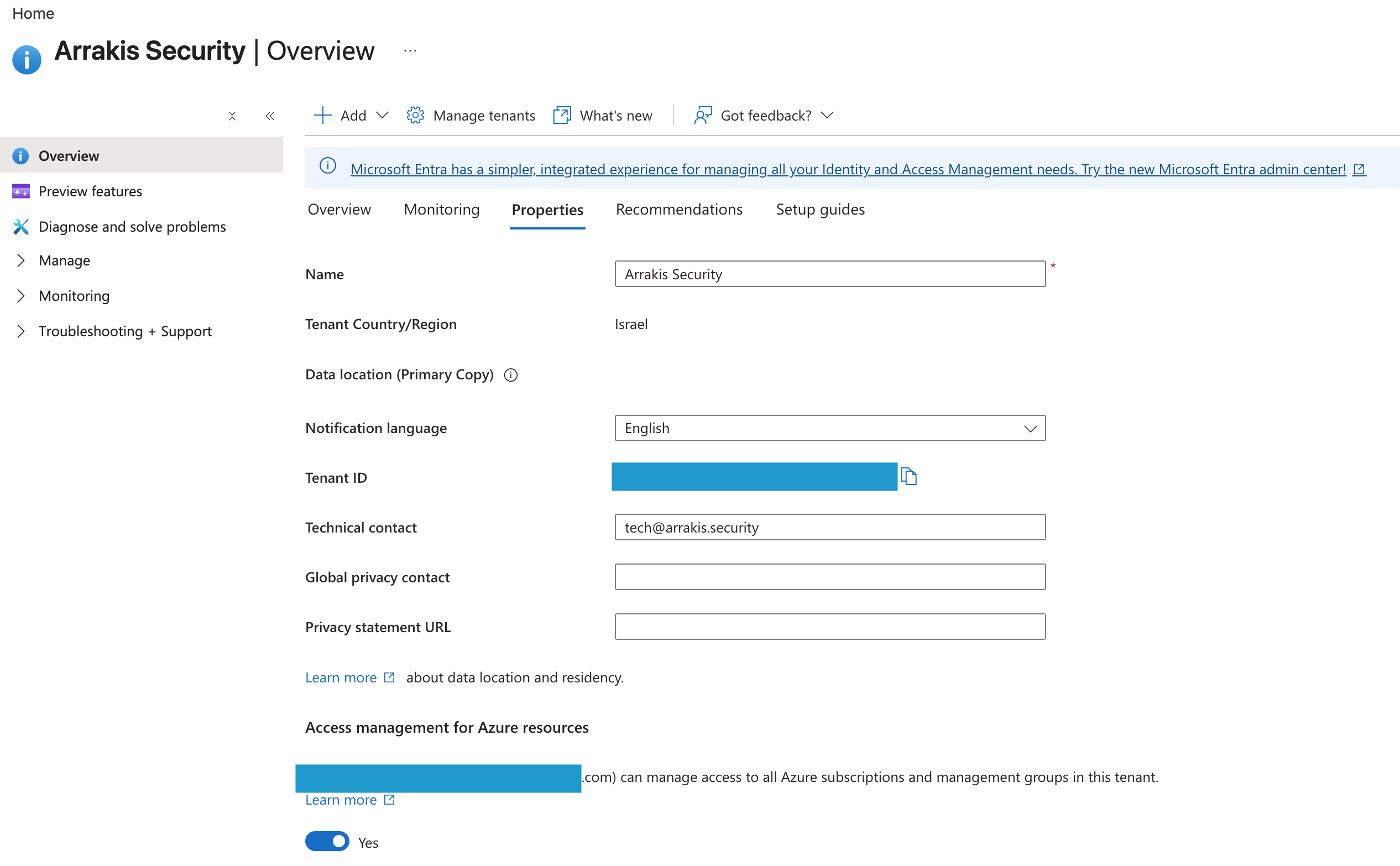
- Sign out and sign back in (the new permission is only picked up on a fresh token). You are now User Access Administrator at the Tenant Root Management Group and every group under it.
- Proceed to step 6.
- Toggle this back to No once you’re done. The setting is meant to be temporary — Microsoft documents this pattern as “elevate access” . Leaving it on grants User Access Administrator across the entire tenant indefinitely.
Only a tenant Global Administrator can change this property. If the Properties page does not show this toggle for you, you are not signed in as a Global Admin — the right person to ask is whoever owns Entra ID in your org.
6. Cover multiple subscriptions in one assignment (Management Groups)
If your tenant has more than one subscription that runs Foundry workloads, do not repeat steps 3 and 4 per subscription — assign the two roles once at a Management Group that contains them all. The roles inherit to every subscription (and every Foundry resource and project) under that group, including any subscriptions added later.
Portal walkthrough
- In the Azure Portal search bar, type Management groups and open the page. (If the page returns “You don’t have access,” you skipped step 5 — go back and toggle Access management for Azure resources to Yes, then sign out and back in.)
- Choose the group that contains all in-scope subscriptions. The Tenant Root Group covers every subscription in the tenant; a custom group (e.g.
mg-ai-workloads) is the cleaner choice if not every subscription should be readable.
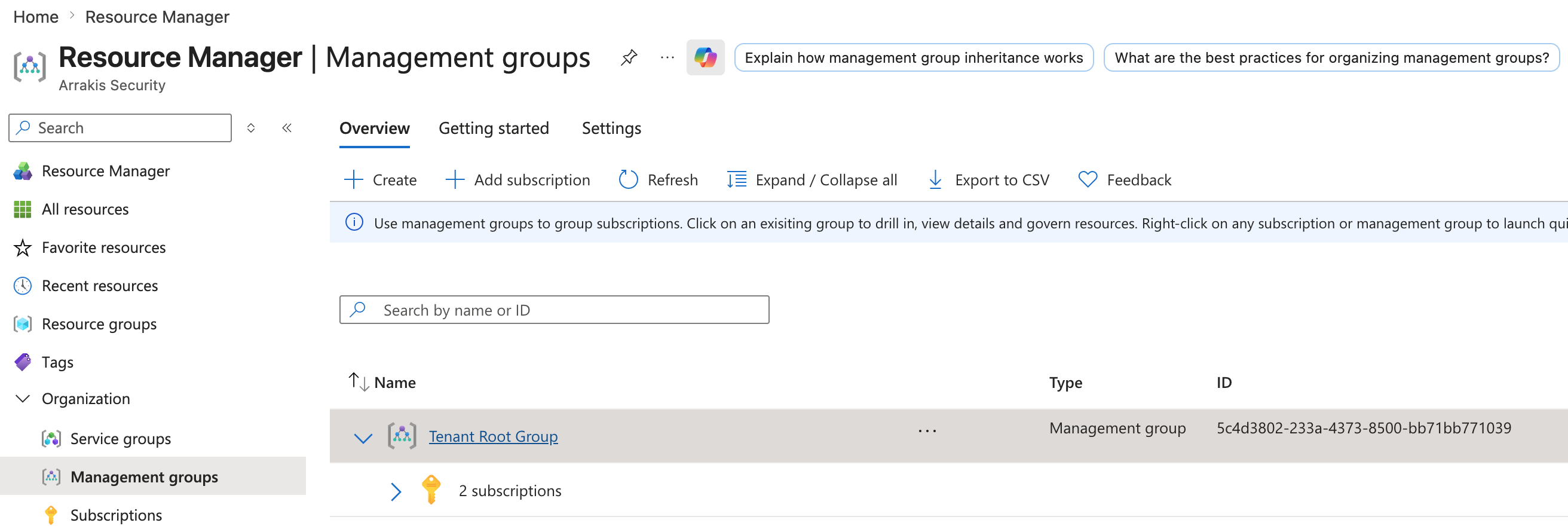
- Click into the group, then Access control (IAM) → + Add → Add role assignment.
- Run the Reader assignment exactly as in step 3, but at this scope.
- Run the Foundry User assignment exactly as in step 4, but at this scope.
- For Tier 2/3 detections, repeat step 4a here: assign Log Analytics Reader and Cost Management Reader at this scope. Both inherit to every subscription under the group.
- Optional — auto-provisioning. If you want Arrakis to attach Application Insights to projects that lack it (see step 4b), also assign Log Analytics Contributor and Azure AI Project Manager at this scope.
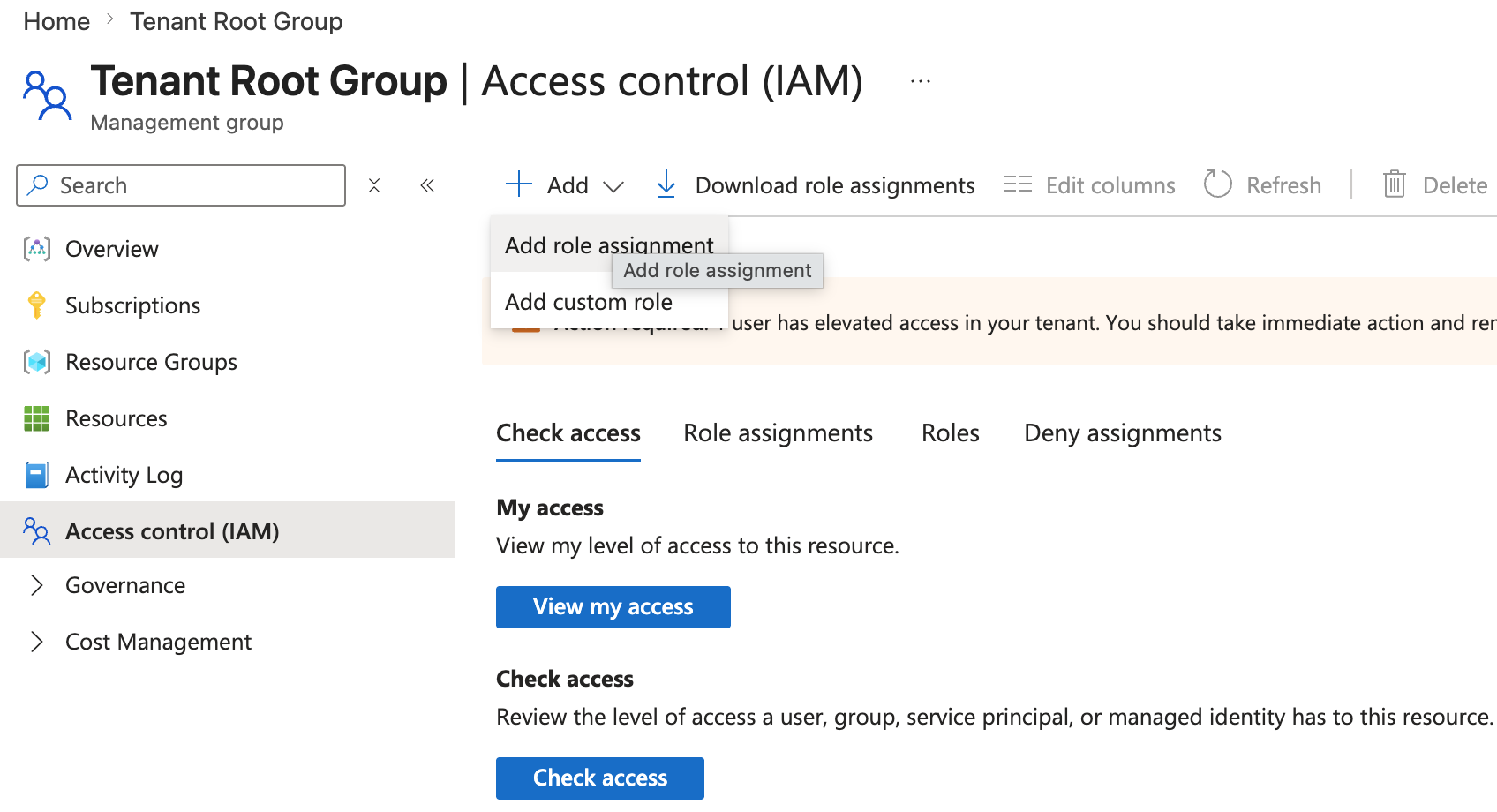
- In the Arrakis connector form, you can paste any subscription ID under that group — the same service principal can read all of them. To onboard each subscription as its own connector instance, repeat the connector form per
subscriptionId; the credentials and roles do not change.
az CLI walkthrough
# Replace with your management group ID (the "name" field, not the display name).
# For the tenant root group, this is the tenant ID.
MG_ID="mg-ai-workloads"
MG_SCOPE="/providers/Microsoft.Management/managementGroups/$MG_ID"

# Reader at MG scope — inherits to every subscription in the group.
az role assignment create \
  --assignee "$APP_ID" \
  --role "acdd72a7-3385-48ef-bd42-f606fba81ae7" \
  --scope "$MG_SCOPE"

# Foundry User at MG scope — inherits to every Foundry project under every subscription.
az role assignment create \
  --assignee "$APP_ID" \
  --role "53ca6127-db72-4b80-b1b0-d745d6d5456d" \
  --scope "$MG_SCOPE"

# --- Tier 2/3 (recommended): read traces + cost data ---
# Log Analytics Reader — reads Foundry runtime traces.
az role assignment create \
  --assignee "$APP_ID" \
  --role "73c42c96-874c-492b-b04d-ab87d138a893" \
  --scope "$MG_SCOPE"

# Cost Management Reader — correlates token cost per trace/call.
az role assignment create \
  --assignee "$APP_ID" \
  --role "72fafb9e-0641-4937-9268-a91bfd8191a3" \
  --scope "$MG_SCOPE"

# --- Optional (Tier 3): let Arrakis attach Application Insights to projects that lack it ---
# Log Analytics Contributor — creates the Log Analytics workspace + Application Insights component.
az role assignment create \
  --assignee "$APP_ID" \
  --role "92aaf0da-9dab-42b6-94a3-d43ce8d16293" \
  --scope "$MG_SCOPE"

# Azure AI Project Manager — attaches Application Insights to each Foundry project.
az role assignment create \
  --assignee "$APP_ID" \
  --role "eadc314b-1a2d-4efa-be10-5d325db5065e" \
  --scope "$MG_SCOPE"

# List the subscriptions the principal can now read across:
az account management-group subscription show-sub-under-mg \
  --name "$MG_ID" \
  --query "value[].{name:displayName, id:name}" \
  -o table
If the az role assignment create calls return AuthorizationFailed, the running identity does not have permission at the MG scope — go back to step 5 and toggle Access management for Azure resources to Yes.
az CLI alternative
The same flow as a script. Substitute <sub-id> and the per-project resource IDs.
# 1. Sign in
az login

# 2. Create the app + service principal + client secret in one shot
SP_JSON=$(az ad sp create-for-rbac \
  --name arrakis-foundry-reader \
  --role Reader \
  --scopes /subscriptions/<sub-id>)

APP_ID=$(echo "$SP_JSON"   | jq -r .appId)
TENANT=$(echo "$SP_JSON"   | jq -r .tenant)
PASSWORD=$(echo "$SP_JSON" | jq -r .password)

echo "tenantId:       $TENANT"
echo "clientId:       $APP_ID"
echo "clientSecret:   $PASSWORD"
echo "subscriptionId: <sub-id>"

# 3. Assign Foundry User at subscription scope (recommended). Use the role ID
#    (53ca6127-db72-4b80-b1b0-d745d6d5456d) so the assignment is stable across
#    the Azure AI User → Foundry User rename. Subscription-scoped Foundry User
#    inherits to every Foundry resource and project, including future ones.
FOUNDRY_USER_ROLE_ID="53ca6127-db72-4b80-b1b0-d745d6d5456d"

az role assignment create \
  --assignee "$APP_ID" \
  --role "$FOUNDRY_USER_ROLE_ID" \
  --scope "/subscriptions/<sub-id>"

# 4. Tier 2/3 detections (recommended): Log Analytics Reader + Cost Management Reader.
#    Same subscription scope as steps above — one command each, no extra IAM navigation.
az role assignment create \
  --assignee "$APP_ID" \
  --role "73c42c96-874c-492b-b04d-ab87d138a893" \
  --scope "/subscriptions/<sub-id>"

az role assignment create \
  --assignee "$APP_ID" \
  --role "72fafb9e-0641-4937-9268-a91bfd8191a3" \
  --scope "/subscriptions/<sub-id>"

# 5. Optional (Tier 3): grant write perms so Arrakis can attach Application Insights
#    to Foundry projects that lack it. Skip this block if your projects already have
#    Application Insights configured, or if you plan to attach it manually per project.
#    You can revoke these roles after the one-time attach — trace reads only need step 4.
az role assignment create \
  --assignee "$APP_ID" \
  --role "92aaf0da-9dab-42b6-94a3-d43ce8d16293" \
  --scope "/subscriptions/<sub-id>"

az role assignment create \
  --assignee "$APP_ID" \
  --role "eadc314b-1a2d-4efa-be10-5d325db5065e" \
  --scope "/subscriptions/<sub-id>"

# Optional sanity check — list the Foundry resources the principal can now reach:
az cognitiveservices account list \
  --query "[?kind=='AIServices' || kind=='AIFoundry'].{name:name, rg:resourceGroup, id:id}" \
  -o table
If your governance posture requires a tighter scope, swap the --scope argument for a Foundry account resource ID (covers all projects under that account) or a project resource ID (single project):
# Foundry resource (account) scope
ACCOUNT_ID="/subscriptions/<sub-id>/resourceGroups/<rg>/providers/Microsoft.CognitiveServices/accounts/<account>"
az role assignment create --assignee "$APP_ID" --role "$FOUNDRY_USER_ROLE_ID" --scope "$ACCOUNT_ID"

# Per-project scope
PROJECT_ID="$ACCOUNT_ID/projects/<project>"
az role assignment create --assignee "$APP_ID" --role "$FOUNDRY_USER_ROLE_ID" --scope "$PROJECT_ID"
Configure the connector in Arrakis
- Sign in to Arrakis. Settings → Integrations → Add integration → Azure AI Foundry.
- Paste the four fields:
| Field | Value | Notes |
|---|---|---|
| Tenant ID | tenantId from step 1 | Plain text |
| Client ID | clientId from step 1 | Plain text |
| Client Secret | secret value from step 2 | Encrypted at rest; only this field is encrypted (matches the Salesforce pattern). |
| Subscription ID | the subscription where Reader was assigned | Plain text |
- Test connection. The test endpoint posts an OAuth2
client_credentialsgrant againsthttps://login.microsoftonline.com/<tenantId>/oauth2/v2.0/tokenwith scopehttps://management.azure.com/.defaultand confirms a token is returned. - Save. Arrakis schedules the first sync.
Verify the connection
After the first sync completes:
- The Agents view lists every Foundry agent across every project under the subscription, grouped by Foundry resource.
- Each agent shows its build type (
prompt_agentfor declarative agents,hosted_agentfor hosted/code agents), model backbone (from the project’s model deployments), and tools (oneStepper tool — see the Appendix for the full list). - Resource and project counts should match
az cognitiveservices account listoutput for the subscription.
If the first sync returns no agents, walk through Troubleshooting.
Troubleshooting
| Symptom | Likely cause | Fix |
|---|---|---|
AADSTS7000215 / invalid_client on test | Wrong client secret, expired secret, or service principal disabled | Generate a fresh client secret in Certificates & secrets, paste again. Confirm the app registration is enabled. |
AADSTS90002 / tenant not found | Wrong tenantId (used the subscription tenant of a different directory) | Re-copy Directory (tenant) ID from the app registration overview. |
| Add role assignment is greyed out in the Portal | The signed-in user is a Contributor (or lower) on the subscription. Role assignment requires Owner or User Access Administrator. | Have a subscription Owner / User Access Administrator run steps 3–4, or have your Entra ID Global Administrator elevate access . |
403 AuthorizationFailed listing accounts immediately after assigning Reader | Role assignment has not finished propagating | Wait ~60 seconds and retry the test. Azure RBAC is eventually consistent. |
403 AuthorizationFailed listing accounts after several minutes | Reader missing at subscription (or management-group) scope, or assigned to the wrong principal | Re-run az role assignment list --assignee <clientId> --scope /subscriptions/<sub-id> and confirm Reader is listed. If the principal is right but the scope is wrong (e.g. assigned at a resource group instead of the subscription), re-do step 3. |
403 listing assistants on a project | Foundry User missing on that project (or its parent resource) — or, less commonly, a Cognitive Services-prefixed role assigned by mistake (those do not grant Foundry data-plane access) | Assign Foundry User (role ID 53ca6127-db72-4b80-b1b0-d745d6d5456d) at project or resource scope. Remove any Cognitive Services User/Contributor assignment from this principal. |
404 on the projects sub-resource | Older Foundry account that does not expose the projects sub-resource | Expected. Arrakis falls back to a synthetic single project keyed off the resource name; no action required. |
| Empty agents list for a project | Project genuinely has no agents, or data-plane endpoint is unreachable | Open Foundry Studio for the project to confirm agents exist. If they do, confirm the project endpoint resolves: https://<resourceName>.services.ai.azure.com/api/projects/<projectName>. |
| Some Foundry accounts skipped | The connector filters to kind=AIServices or kind=AIFoundry. Other Cognitive Services kinds are ignored by design. | No action — non-Foundry Cognitive Services accounts are out of scope. |
| Tier 2/3 detections not firing despite active traffic | Missing Log Analytics Reader or Cost Management Reader on the connector’s principal — or projects have no Application Insights attached so no traces are being produced | Run az role assignment list --assignee <clientId> --all --query "[].{role:roleDefinitionName, scope:scope}" -o table and confirm both roles appear at subscription/MG scope. If the roles are present, open a Foundry project in the Portal → Tracing and verify Application Insights is attached; if not, either attach it manually or grant the optional auto-provisioning roles. |
| Cost figures missing from trace rows | Cost Management Reader missing, or assigned below subscription scope (the role only applies at sub level or above) | Assign Cost Management Reader at subscription or management-group scope. |
Auto-provisioning fails with 403 AuthorizationFailed when Arrakis tries to attach Application Insights | Missing Log Analytics Contributor or Azure AI Project Manager, or one of them assigned to the wrong scope | Assign both roles per step 4b. Confirm with az role assignment list --assignee <clientId>. If auto-provisioning is not something you want, disable it in the connector settings — the read-only Tier 2 flow continues to work. |
Security considerations
- Client secret rotation. Rotate on the cadence required by your policy (recommend 6 or 12 months). After issuing a new secret, paste it into Arrakis (Settings → Integrations → Edit Azure AI Foundry); the existing connection record is updated and the encrypted blob re-saved.
- Encrypted at rest. Only
clientSecretis encrypted;tenantId,clientId, andsubscriptionIdare stored in plain text. This matches the Salesforce connector pattern. - Least privilege. Reader is the lowest built-in subscription-scoped read role and grants no access to keys, secrets, or data-plane reads. Data reads remain gated by Foundry User per project. Foundry User itself is documented by Microsoft as the “least privilege access role in Foundry” — it grants reader plus the data actions for the project’s agents and nothing more. Log Analytics Reader and Cost Management Reader are similarly read-only, scoped to Log Analytics query and cost data respectively — no write actions.
- No write paths in the required roles. Reader, Foundry User, Log Analytics Reader, and Cost Management Reader are all read-only. Arrakis cannot create, modify, or delete Foundry resources, projects, agents, deployments, workspaces, or cost budgets — by design.
- Write paths only for optional auto-provisioning. The two auto-provisioning roles (Log Analytics Contributor and Azure AI Project Manager) are the only roles in this connector that grant any write access, and they are strictly opt-in. Log Analytics Contributor can create/edit Log Analytics workspaces and Application Insights components (nothing else); Azure AI Project Manager can edit Foundry project configuration (nothing outside Foundry). Both roles can be revoked after the one-time attach — Tier 2 trace reads continue to work with only the read-only roles above.
- Network egress. Outbound only, to
login.microsoftonline.com,management.azure.com,api.loganalytics.io(trace reads),management.azure.comcost APIs, and<resourceName>.services.ai.azure.comfor each Foundry resource.
Appendix
Required and recommended roles
| Role | Role ID | Scope | Plane | Tier | Requirement |
|---|---|---|---|---|---|
| Reader | acdd72a7-3385-48ef-bd42-f606fba81ae7 | Subscription or management group | ARM control plane | 1 | Required |
| Foundry User (formerly Azure AI User) | 53ca6127-db72-4b80-b1b0-d745d6d5456d | Subscription (recommended), Foundry resource, or project | Foundry data plane | 1 | Required |
| Log Analytics Reader | 73c42c96-874c-492b-b04d-ab87d138a893 | Subscription (recommended) or MG. RG scope works for tighter segmentation. | Log Analytics query API | 2 | Recommended |
| Cost Management Reader | 72fafb9e-0641-4937-9268-a91bfd8191a3 | Subscription or MG (only levels supported by the role) | Cost Management API | 2 | Recommended |
| Log Analytics Contributor | 92aaf0da-9dab-42b6-94a3-d43ce8d16293 | Subscription (recommended), MG, or a designated observability RG | ARM control plane (writes to Log Analytics + Application Insights only) | 3 | Optional — only for auto-provisioning |
| Azure AI Project Manager | eadc314b-1a2d-4efa-be10-5d325db5065e | Subscription (recommended), Foundry resource, or project | Foundry control plane (project config only) | 3 | Optional — only for auto-provisioning |
Do not substitute Cognitive Services User, Cognitive Services Contributor, or Azure AI Developer for Foundry User. Microsoft’s Foundry RBAC documentation calls out that Cognitive Services-prefixed roles do not apply to Foundry projects, and Azure AI Developer is scoped to AML workspaces and legacy Foundry hubs (not projects). For auto-provisioning, do not substitute Contributor for the Log Analytics Contributor + Azure AI Project Manager pair — Contributor grants write/delete on every resource in the subscription, far beyond what auto-provisioning needs.
OAuth2 token audiences
| Audience | Used for |
|---|---|
https://management.azure.com/.default | List Foundry accounts, projects, model deployments; read Cost Management data; create Log Analytics workspaces + Application Insights components (auto-provisioning); attach Application Insights to Foundry projects (auto-provisioning). |
https://ai.azure.com/.default | List agents/assistants on a project’s data-plane endpoint. |
https://api.loganalytics.io/.default | Read Foundry runtime traces via the Log Analytics query API. |
API versions
| Surface | API version |
|---|---|
| Cognitive Services accounts | 2024-10-01 |
| Foundry projects | 2025-04-01-preview |
| Model deployments | 2024-10-01 |
| Agents (data plane) | 2025-05-01 |
Supported tools
Each tool a Foundry agent has configured becomes a Step on that agent in Arrakis:
code_interpreter, file_search, web_search, azure_ai_search, azure_functions, function, mcp, openapi, image_generation, browser_automation, computer_use, sharepoint, fabric.
Build-type detection
| Detected as | Trigger |
|---|---|
prompt_agent | Default — declarative agent (instructions + model + tools, no hosted code). |
hosted_agent | Agent metadata type is hosted or code, or metadata references container, code, container_app, or deployment. |
Endpoint reference
| Operation | URL |
|---|---|
| Token | POST https://login.microsoftonline.com/{tenantId}/oauth2/v2.0/token |
| List accounts | GET https://management.azure.com/subscriptions/{subscriptionId}/providers/Microsoft.CognitiveServices/accounts?api-version=2024-10-01 |
| List projects | GET .../accounts/{name}/projects?api-version=2025-04-01-preview |
| List deployments | GET .../accounts/{name}/deployments?api-version=2024-10-01 |
| List agents | GET https://{resourceName}.services.ai.azure.com/api/projects/{projectName}/assistants?api-version=2025-05-01 |
Limitations
- The Foundry agent API does not expose creator info —
contributorsis empty for every agent. - Arrakis does not consume an execution-trace API for Foundry; runtime traces are sourced from Azure Monitor + Event Grid where customers have those configured.
- Per-resource, per-project, and per-agent errors are isolated during sync — one failed project does not abort the rest.
Cross-references
- Connectors overview — coverage matrix and where Foundry sits among the other Autonomous Agents.
- Azure docs: Azure AI Foundry RBAC — authoritative source for the Foundry User role and the explicit warning against Cognitive Services-prefixed roles.
- Azure docs: Reader built-in role .
- Azure docs: Application and service principal objects in Microsoft Entra ID .